Pages Become Slow
The site may still load, but each page takes too long. Visitors may give up before they read anything or complete an enquiry.

DDoS Protection
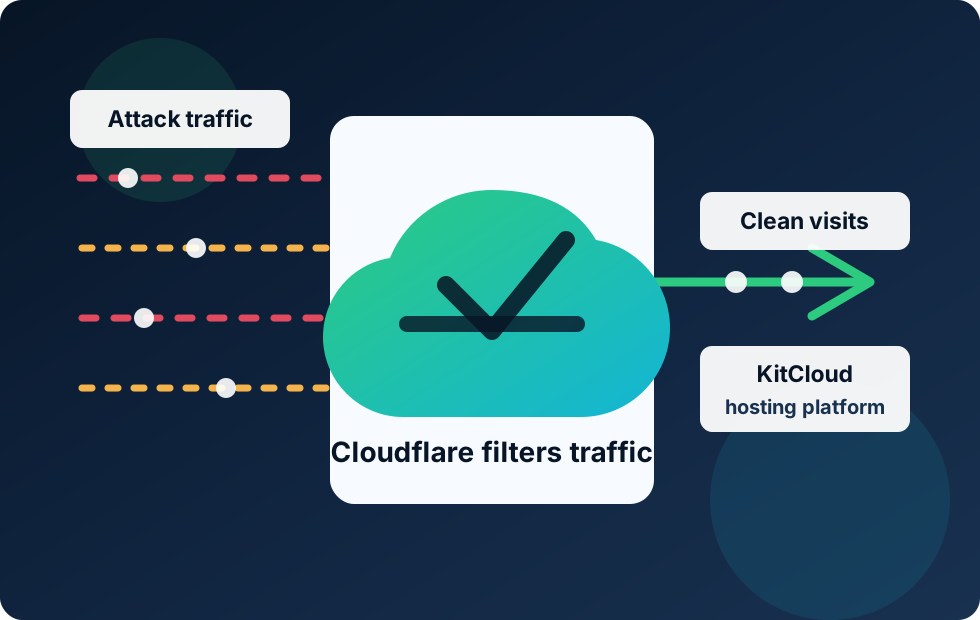
A DDoS attack is when a website is deliberately flooded with traffic so real visitors struggle to get through. KitCloud uses Cloudflare in front of hosted websites to help absorb and filter that unwanted traffic before it reaches the hosting platform.
Plain English
DDoS stands for distributed denial of service. In simple terms, it means lots of computers or devices try to overwhelm a website, server or online service at the same time.
A normal website visit is simple: one person asks for a page, the server responds, and the page loads. A DDoS attack tries to break that rhythm by sending a large amount of unwanted traffic at once. The aim is not usually to steal data. The aim is to make the service slow, unstable or unavailable.
The word distributed matters because the traffic does not normally come from one place. It can come from many devices across the internet, sometimes including infected computers, compromised servers or poorly secured connected devices. That makes a DDoS attack harder to stop than one bad visitor, because blocking a single address is rarely enough.
Why It Matters
Most business owners do not need to know every technical detail. What matters is the practical impact: customers cannot get to the website when they need it.
The site may still load, but each page takes too long. Visitors may give up before they read anything or complete an enquiry.
Good traffic can be crowded out by bad traffic, a bit like genuine customers being unable to get through a packed doorway.
If unwanted requests reach the hosting server directly, they can use resources that should be serving real visitors.
Cloudflare sits in front of the website. It can spread, inspect and filter traffic across its network before sending clean requests to the KitCloud hosting platform.
The Front Layer
KitCloud uses Cloudflare as a protective web layer where suitable. That means website traffic can reach Cloudflare first, rather than going straight to the KitCloud server that hosts the website.
Cloudflare's own documentation explains that its DDoS systems analyse traffic samples, look for attack patterns and use managed rules to mitigate attacks across network and application layers. Put more simply: Cloudflare watches for traffic that behaves like an attack, then acts before that traffic overwhelms the origin server.
This is valuable because a hosting server should be busy serving websites, databases and normal visitor requests. It should not have to be the first and only line of defence against a flood of unwanted traffic. By placing Cloudflare in front, KitCloud gives hosted websites an additional public shield.
This also connects closely to Cloudflare proxying. Proxying is the front-door arrangement. DDoS mitigation is one of the useful protections that can happen at that front door.
Covered Services
KitCloud Web Hosting and WordPress Hosting sit behind Cloudflare for the public website layer, helping protect hosted websites from common DDoS attack traffic before it reaches the hosting platform.
Our £1.25 Per Month Web Hosting gives businesses a simple way to host a professional website, with Cloudflare adding protection at the public web layer.
View Web HostingOur £1.25 Per Month WordPress Hosting is designed for WordPress sites that need practical hosting, DirectAdmin access and a protected web front layer.
View WordPress HostingBotnet: A group of computers or devices that an attacker can control. The owner of each device may not even know it is being used.
Traffic flood: A large rush of requests sent to a website or server. Some floods are basic. Others are designed to look more like real web visits.
Layer 3, Layer 4 And Layer 7: These are ways of describing where an attack happens in internet communication. For a business owner, the useful version is this: some attacks target the network plumbing, while others target the website or application itself.
Mitigation: Reducing the impact of the attack. It does not mean the attack never happened. It means the protective layer works to absorb, challenge, block or filter the bad traffic so the website has a better chance of staying available.
Origin server: The real hosting server where the website lives. Cloudflare can sit in front of the origin server, while KitCloud still hosts the website itself.
Hosting is not only about disk space and a control panel. A useful hosting service needs to think about what happens before a visitor reaches the website. If the public web layer is weak, the hosting server can be put under unnecessary pressure. That can affect page speed, availability and trust.
For businesses, freelancers and organisations, a DDoS attack can feel confusing because the website may simply appear broken. The owner may not see a clear warning saying "this is an attack". They may just see slow pages, failed checkouts, missed enquiries or customers saying the website is down.
That is why KitCloud treats Cloudflare protection as part of the platform story. The aim is to provide straightforward hosting that has sensible protection around it from day one. It is not a promise that every attack will be invisible, and it does not remove the need for website updates or good security habits. It does mean the website is not left standing alone on the public internet without a recognised front-line filtering layer.
Cloudflare's approach is especially useful because DDoS attacks are distributed. If bad traffic arrives from many different places, a single server has a much harder job. Cloudflare can use a much larger network in front of the site, helping spread and filter traffic before the clean requests are passed to KitCloud.
Good DDoS protection should be quiet most of the time. A normal visitor should not have to understand Cloudflare, network layers or mitigation rules. They should simply type in the website address and get the page they asked for.
Behind the scenes, the protective layer is looking for behaviour that does not look like normal browsing. That could be a sudden flood of requests, repeated access to the same part of a site, suspicious request patterns or traffic that matches known attack methods. Depending on the situation, Cloudflare can absorb traffic across its network, challenge suspicious requests, block traffic that matches attack rules, or pass clean visits through to the KitCloud hosting server.
This matters because protection that blocks too much can become its own problem. A business does not want real customers challenged or blocked unnecessarily. The aim is balance: reduce malicious traffic while allowing genuine visitors, search engines and everyday business traffic to keep moving.
For most KitCloud customers, the important point is simple. You do not need to buy a separate enterprise security product before your website has any protection at all. The public web layer for our hosted sites is designed around Cloudflare from the start, giving Web Hosting and WordPress Hosting customers a stronger default position than a bare server exposed directly to the internet.
DDoS mitigation is one layer of protection, not the whole security plan. A website still needs strong passwords, software updates, sensible plugins, safe forms, backups and careful account access. A WordPress site with old plugins can still have security issues even if the traffic reaches it through Cloudflare.
It also does not mean every type of traffic can or should be treated the same way. Email works differently from website traffic, and some DNS records are not proxied through Cloudflare. DDoS protection is strongest when the service is configured properly and the hosting platform behind it is well managed.
The simple takeaway is this: Cloudflare helps handle hostile traffic at the edge, KitCloud runs the hosting platform behind it, and the website owner still keeps the website itself in good order.
This article is written in plain English for KitCloud customers. These external references explain the underlying terms and Cloudflare behaviour in more depth:
Related Detail
Read the plain-English details behind KitCloud's security and backup setup before choosing or moving hosting.
Enterprise-grade security equipment, software firewalls, Cloudflare protection, SSL and safe access controls explained simply.
Read More About SecurityHourly website restore points, protected cloud backups and tape backup storage explained in practical terms.
Read More About BackupsHosting With Protection
Start with KitCloud Web Hosting or WordPress Hosting and get a website service designed around practical hosting, clear pricing and Cloudflare-backed web protection.