First Visit Fetches The File
If Cloudflare does not already have a suitable file cached, it can request it from the KitCloud origin server.

Edge Caching And CDN Routing
A CDN helps serve website files from locations closer to visitors. KitCloud uses Cloudflare in front of hosted websites so suitable content can be cached and routed more efficiently, helping pages feel faster for real people.
Plain English
CDN stands for content delivery network. In normal language, it is a network of servers that helps deliver website content from a place closer to the visitor.
Without a CDN, every visitor has to come back to the main hosting server for the files that make up the website. That includes images, style sheets, scripts and other files used to build the page in the browser. If the visitor is far away, or if lots of people are asking for the same files at once, that can make the website feel slower.
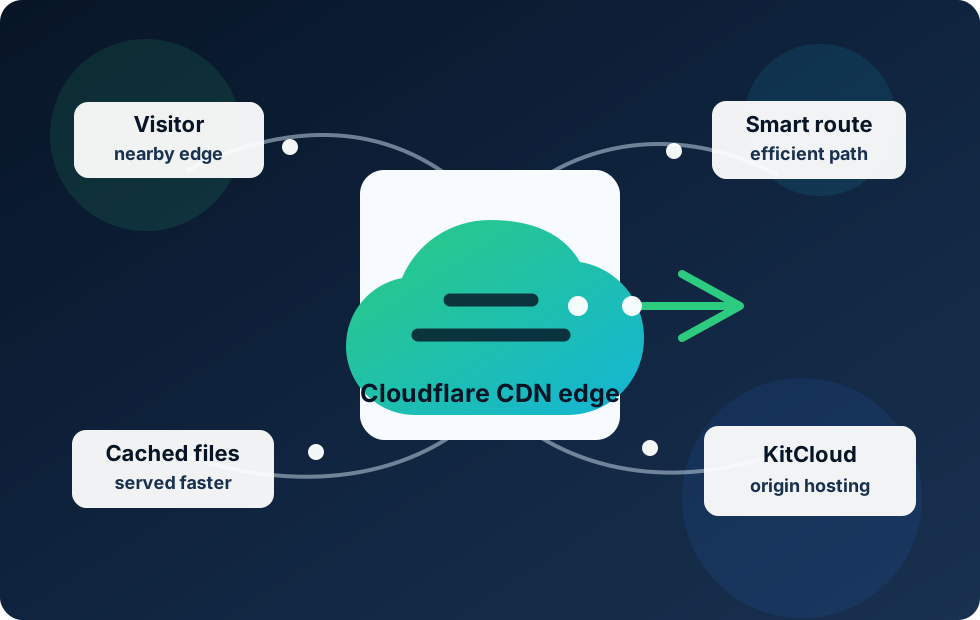
With a CDN, suitable files can be stored at the edge of the network. The edge simply means a location nearer to the visitor, not the deepest part of the hosting platform. When someone loads the website, Cloudflare can serve cached files from its network and only go back to the KitCloud origin hosting server when it needs to.
How It Works
Edge caching is a practical idea: keep a copy of commonly requested website files closer to the people who need them.
If Cloudflare does not already have a suitable file cached, it can request it from the KitCloud origin server.
Cloudflare can keep a cached copy at the edge, depending on the file type, cache rules and the website configuration.
When another visitor nearby asks for the same file, Cloudflare may serve it from the edge instead of asking the origin again.
Website visitors do not care where a file came from. They care whether the page appears quickly, feels responsive and lets them get on with what they came to do.
Routing
Caching is about storing files closer to visitors. Routing is about choosing a better path for traffic to travel.
Cloudflare explains that traffic can be handled by a Cloudflare server close to the source, using its global network and Anycast routing. For a business owner, the useful version is simple: the visitor does not always need to take a long or awkward route across the internet just to reach a website file.
Good routing can reduce unnecessary distance and avoid slower paths. Caching can reduce how often the KitCloud origin server needs to send the same files again and again. Together, those two ideas can improve the everyday visitor experience, especially on image-heavy pages, WordPress sites, brochure sites, landing pages and local business websites.
This also connects to Cloudflare proxying. Proxying puts Cloudflare in front of the website. CDN caching and routing are part of what Cloudflare can then do at that front layer.
Business Impact
Performance is not just a technical preference. Slow pages can cost enquiries, sales and trust.
When common files load quickly, people can reach the content, products or enquiry form sooner.
A fast site feels more trustworthy than one that hesitates before loading basic images and layout files.
Cached files can reduce repeat work for the origin server, leaving it better placed to handle dynamic website tasks.
If a page becomes popular, the CDN can help serve repeated requests without sending every file request back to origin.
Search engine optimisation is still mostly about useful content, relevance, good structure, crawlable pages and trusted signals. A CDN will not magically rank a poor page. It will not replace good writing, sensible page titles, local business information or clear service pages.
However, performance does matter. Google Search Central recommends that site owners achieve good Core Web Vitals for success with Search and for a better user experience generally. Core Web Vitals measure real-world user experience around loading performance, interactivity and visual stability. Google also announced page speed as a ranking factor for mobile searches back in 2018, while making clear that the slowest pages are most affected and that search intent remains very important.
That is the honest SEO message: speed is not the whole ranking system, but it supports the kind of user experience search engines want to reward. A fast, stable page is more likely to keep visitors engaged, help them read the content, complete enquiries and move around the site without frustration.
Edge caching can help with the loading side of that picture. Images, CSS and JavaScript files are often part of what the browser needs before a page looks complete. If those files can be served efficiently from Cloudflare's CDN, visitors may see useful content sooner. That can support better Largest Contentful Paint, one of Google's Core Web Vitals for loading performance.
KitCloud Web Hosting and WordPress Hosting are designed to keep the public offer simple while putting sensible platform choices behind it. Cloudflare is part of that platform story. It gives hosted websites a recognised CDN layer in front of the origin hosting service.
For a business website, this can be a real advantage. The site may have a home page, service pages, images, a contact page, maybe a blog or WordPress content. Many of those assets are good candidates for caching. The more that can be delivered efficiently at the edge, the less the visitor has to wait for the origin server to send every repeat asset from scratch.
For WordPress, the same principle applies. WordPress is powerful, but it can generate pages dynamically and rely on themes, plugins, images and scripts. A CDN layer does not remove the need for sensible plugins, image optimisation and good WordPress maintenance, but it can help deliver static assets more efficiently to visitors.
KitCloud also combines this performance layer with the wider Cloudflare front door. That means CDN caching sits alongside related protections such as DDoS mitigation and the proxying setup explained in our Cloudflare proxying guide.
Edge caching is useful, but it is not magic. It does not make a badly built website perfect. It does not shrink enormous images by itself unless image optimisation features are configured. It does not fix broken JavaScript, poor layout, weak content or a slow third-party script loaded from somewhere outside the website.
Cloudflare also explains that caching depends on configuration and content. Some resources are cached by default, some may need rules, and some should not be cached because they are personal, private or dynamic. A logged-in account page, basket page or custom dashboard should be treated differently from a public logo, stylesheet or brochure image.
The best result comes from layering good choices together: reliable hosting, sensible website design, optimised images, careful WordPress plugins, Cloudflare CDN caching, and monitoring through tools such as PageSpeed Insights, Lighthouse and Search Console.
Origin server: The main hosting server where the website lives. For KitCloud customers, this is the KitCloud hosting platform.
Edge server: A server closer to the visitor that can help deliver cached website files more quickly.
Cache: A saved copy of a file, such as an image or stylesheet, so it does not always need to be fetched from the origin server.
Cache hit: Cloudflare already has the file cached and can serve it from the edge.
Cache miss: Cloudflare does not have the file yet, so it needs to fetch it from the origin server.
TTL: Time to live. This controls how long a cached file can be kept before it should be checked or refreshed.
Anycast: A routing approach that can direct visitors to a nearby network location using the same advertised address across multiple places.
This article is written in plain English for KitCloud customers. These external references explain the underlying CDN, caching, routing and SEO topics in more depth:
Related Detail
Read the plain-English details behind KitCloud's security and backup setup before choosing or moving hosting.
Enterprise-grade security equipment, software firewalls, Cloudflare protection, SSL and safe access controls explained simply.
Read More About SecurityHourly website restore points, protected cloud backups and tape backup storage explained in practical terms.
Read More About BackupsFaster Hosting Foundations
Start with KitCloud Web Hosting or WordPress Hosting and get a service designed around simple pricing, practical hosting tools and Cloudflare-backed website delivery.