Reduces Spoofing Risk
SPF helps receiving servers reject or distrust mail sent from servers that are not authorised for your domain.

Email Security
SPF is an email authentication record that lists the mail servers allowed to send email for your domain. It helps receiving mail services spot messages that claim to be from you but came from somewhere unexpected.
Plain English
SPF stands for Sender Policy Framework. In normal language, it is a DNS record that says: these are the servers allowed to send email for this domain.
If somebody tries to send mail pretending to be from your domain, the receiving mail service can check the SPF record. If the sending server is not listed, that message looks suspicious. SPF does not solve email security on its own, but it gives receiving systems an important first check.
KitCloud sets up SPF support for hosted email domains so business email has a clearer sending identity. That matters for day-to-day trust, deliverability and reducing domain spoofing.
Why It Matters
Email was not originally built with strong identity checks. SPF helps add one of those checks at domain level.
SPF helps receiving servers reject or distrust mail sent from servers that are not authorised for your domain.
Correct SPF records help legitimate mail look more trustworthy to modern receiving systems.
SPF is strongest when used alongside DKIM signatures and a DMARC policy.
SPF is easiest to understand if you think of it as a published sending list for a domain. Your domain has DNS records, and one of those records can say which servers are allowed to send email for that domain. When a receiving mail service gets a message claiming to be from your domain, it can look up that list and ask a simple question: did this message come from a server the domain owner has approved?
For example, if a business uses KitCloud for email, the mail sent through the KitCloud mail server should be included in the allowed sending path. If the same business also uses a newsletter service, booking system, accounts package or CRM to send mail from the same domain, those services may also need to be included. SPF is not about the wording inside the email. It is about the route the message took and whether the sending server is expected.
The formal SPF standard is published as RFC 7208. Customers do not need to read the full technical specification to use email safely, but it is useful to know that SPF is a recognised standard rather than a KitCloud-only feature. Major receiving services use SPF checks as one of the signals they consider when deciding whether a message is legitimate, suspicious, badly configured or likely to be spoofed.
An SPF record is normally stored as a DNS TXT record. It might look something like this in plain form: v=spf1 include:examplemailhost.com -all. The first part, v=spf1, says the record is an SPF record. The middle part lists the sending source. The final part says what should happen if the message comes from somewhere else.
The final part is important. A soft ending such as ~all says messages from other places should be treated as suspicious. A harder ending such as -all says other senders are not authorised. Many domains start with a softer setup while mail sources are being checked, then move to a stricter setup when the business is confident that all legitimate sending services are listed. The right choice depends on how the domain is used.
A common mistake is to create more than one SPF record for the same domain. That can break SPF because receiving mail services may not know which one to trust. Another common mistake is adding old suppliers and never removing them. A tidy SPF record should list the services that actually send mail for the domain today. If a marketing platform, CRM or helpdesk is no longer used, it should normally come out of the SPF record.
SPF records also have a practical lookup limit. If a record pulls in too many outside services through includes, it can become too complicated and fail. That is why the cleanest SPF setup is not always the longest one. For small business email, the best SPF record is usually direct, accurate and easy to review.
Domain spoofing is when someone sends mail that appears to come from a domain they do not control. Without email authentication records, a domain is easier to impersonate. A scammer could try to make a message look as if it came from a business owner, accounts team or support address. SPF helps receiving systems see whether the message came from an authorised sending route.
That does not mean every failed SPF message is automatically fraud, and it does not mean every passed SPF message is automatically safe. Email forwarding, third-party tools and badly configured services can all affect results. Still, SPF gives mail providers a useful first check. It helps separate expected mail flow from mail that comes from an unknown or unauthorised place.
For a business, this matters because email trust affects normal work. Quotes, invoices, password resets, contact form replies and customer support messages all rely on people receiving and trusting messages. If authentication is missing or wrong, legitimate email can look weaker to receiving services. If authentication is present and tidy, the domain has a better foundation for deliverability and reputation.
SPF checks the sending server. It does not prove the message content is safe, and it does not stop every phishing attempt. A message can pass SPF and still contain a bad link, a misleading attachment or a fake payment request. SPF is one part of the security picture, not the whole picture.
SPF also does not sign the message itself. If the content needs a domain-level signature, that is the job of DKIM. If the business wants a policy that tells receivers what to do when checks fail, that is the job of DMARC. SPF is powerful because it answers one specific question clearly: was this sending server allowed?
Forwarding can also make SPF harder. If a message is forwarded through another mail system, the final receiving server may see the forwarding server rather than the original sending server. Some systems handle this well and some need extra configuration. This is one reason modern domain email should use SPF, DKIM and DMARC together rather than relying on a single check.
KitCloud enables SPF for hosted email domains as part of the email security baseline. The aim is to make normal business email easier to trust from day one, without asking customers to learn every detail of DNS before they can send mail from their domain. For customers using KitCloud email only, the SPF setup can be kept simple.
If a customer later adds a third-party sending tool, the SPF record may need to be reviewed. Examples include email marketing platforms, invoicing tools, booking systems, CRM software, helpdesk platforms and website form services that send from the customer domain. If those tools send mail using the domain but are not included, legitimate messages may fail SPF. If too many unused tools are included, the record becomes messier than it needs to be.
KitCloud keeps DNS and email management close together through domain services and Email Hosting. That means SPF can be reviewed alongside the rest of the domain setup. The goal is not to make customers manage complex records alone. The goal is to keep the sending identity clean, understandable and maintainable.
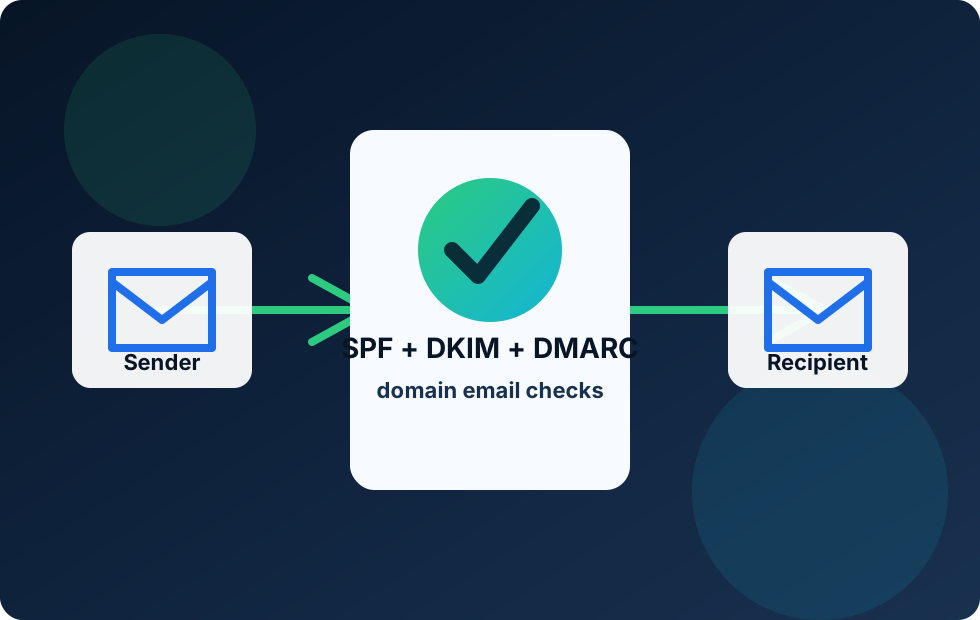
SPF, DKIM and DMARC are often mentioned together because they solve related problems. SPF checks whether the sending server is allowed. DKIM adds a signature to the message. DMARC brings those checks together and compares them with the visible From domain that the recipient sees.
In practice, SPF is usually the first foundation. DKIM then helps protect the message identity even when forwarding or routing changes the path. DMARC then gives the domain owner a policy and reporting layer. Cloudflare explains these records as DNS-based mechanisms for helping receiving mail servers verify whether an email really came from the domain it claims to use. That is why KitCloud treats SPF as part of a wider email security setup rather than a standalone checkbox.
For most customers, the important takeaway is simple: SPF helps protect the domain from obvious misuse and helps legitimate email look more trustworthy. It should be accurate, kept tidy and reviewed whenever the business changes how it sends email.
SPF should be reviewed whenever a new service starts sending email for the domain. That includes contact forms, marketing tools, payment platforms, helpdesks, booking systems and accounting software. If the sending route changes, the SPF record should be checked as part of that change.
It is also worth reviewing SPF when a supplier is removed. Leaving old sending services in place can make a domain easier to misuse and harder to troubleshoot. A clean SPF record is easier for a business to understand and easier for support teams to maintain.