Before The Website Loads
The browser has to find the site, connect to it and agree on a secure connection before the visitor sees the page.

TLS And Security
TLS is the technology behind secure HTTPS website visits. KitCloud uses Cloudflare in front of hosted websites so the public-facing web layer can support HTTPS, filtering and sensible security controls before traffic reaches the hosting platform.
Plain English
TLS stands for Transport Layer Security. In everyday terms, it is the security technology that helps protect the connection between a visitor's browser and a website.
When a website uses HTTPS, the browser and the website agree on a secure connection before normal page content is exchanged. That secure connection helps keep the visit private, helps protect information from being changed in transit, and helps the browser confirm it is talking to the expected website.
The older term many people still recognise is SSL. Strictly speaking, modern secure websites use TLS rather than the old SSL protocol, but people still say SSL certificate when they mean the certificate used for HTTPS. For a business owner, the practical takeaway is simple: HTTPS is the secure version of normal web browsing, and TLS is the technology that makes it work.
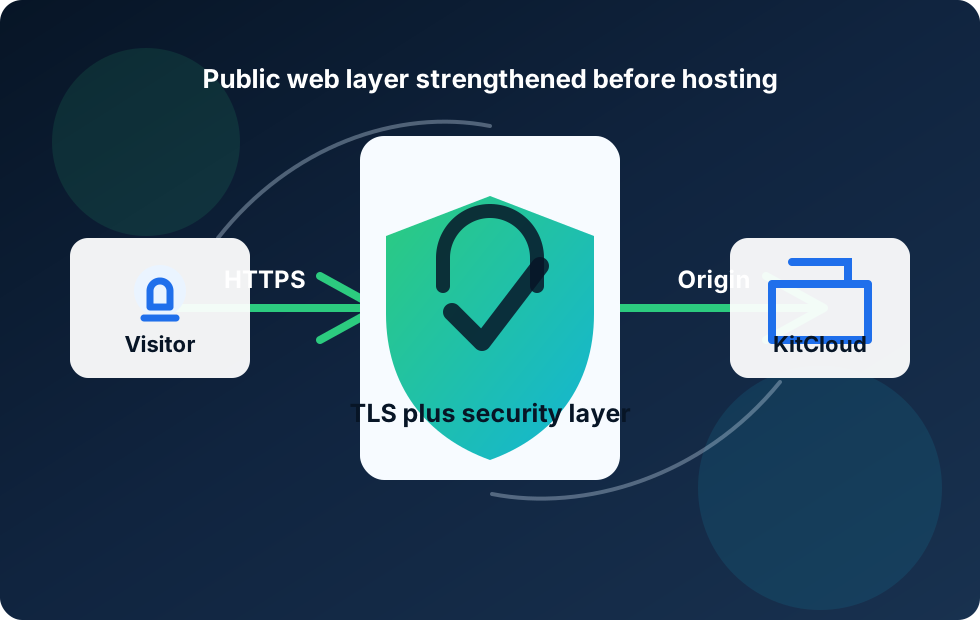
Public Web Layer
The public web layer is the part of a hosting service that visitors meet first on the open internet.
The browser has to find the site, connect to it and agree on a secure connection before the visitor sees the page.
Cloudflare can sit in front of the origin server, helping handle the visitor-facing HTTPS and security layer.
The actual website still lives on the KitCloud hosting platform, with Cloudflare acting as a stronger front layer.
TLS helps make normal website visits safer and more trustworthy. Visitors expect to see HTTPS on any professional website, especially if forms, logins or customer details are involved.
HTTPS
TLS is not something visitors usually think about. They notice the result: the website loads over HTTPS and the browser treats the connection as secure.
The first job is encryption. If a visitor submits a contact form, enters a password or moves through a checkout, HTTPS helps stop that information being readable to others while it travels across the network. That does not mean the website itself is automatically perfect, but it does protect the journey between browser and website.
The second job is authentication. Certificates help the browser check that it is connecting to the expected website rather than an impostor. The third job is integrity, which helps protect data from being silently changed while it is in transit.
Cloudflare can provide the visitor-facing TLS layer for proxied web traffic and can also secure the connection from Cloudflare back to the origin when configured correctly. For KitCloud, that means the public web layer can be strengthened before traffic reaches the hosting server.
Security Features
The public web layer is not just about one certificate. It is a collection of sensible controls around how visitors reach the site.
Secure HTTPS visits help protect information in transit and give visitors the browser security signal they expect.
Cloudflare can sit between visitors and hosted services, reducing direct exposure of the origin hosting server.
Firewall-style rules and managed security features can help identify and reduce suspicious web requests where configured.
Cloudflare can help absorb and filter attack traffic before it reaches the KitCloud hosting platform.
A modern business website is expected to use HTTPS. Browsers warn users about insecure pages, customers are more cautious than they used to be, and search engines expect website owners to take security seriously. If a site asks visitors to fill in a form, request a quote, create an account or send any personal information, HTTPS is not optional in any practical sense.
Google has also treated HTTPS as a ranking signal for many years. That does not mean HTTPS alone will make a website rank. Good content, relevance, useful service pages, local signals and overall quality still matter. But HTTPS is part of the professional baseline. A secure, fast and well-structured site is easier to trust than one that feels neglected.
For KitCloud customers, the message is straightforward. Our Web Hosting and WordPress Hosting are built with a secure public web layer in mind. Cloudflare helps provide the front layer for suitable web traffic, while KitCloud hosts the website behind it.
This also works alongside the other Cloudflare topics in this article series. Proxying explains how Cloudflare sits in front of hosted websites. DDoS protection explains how attack traffic can be absorbed and filtered. Edge caching and CDN routing explains how performance can improve for visitors. TLS and HTTPS are the security part of that same front-door story.
Cloudflare has SSL/TLS modes that control how traffic is secured between the visitor, Cloudflare and the origin server. The exact configuration matters because there are effectively two journeys: browser to Cloudflare, and Cloudflare to the origin hosting server.
A weak configuration can protect only part of the journey. A stronger configuration protects the visitor-facing connection and the connection from Cloudflare back to the origin. That is why SSL/TLS setup should be treated as part of the hosting platform, not as a decorative browser padlock added at the end.
For customers, the technical details do not need to be stressful. The important point is that a professional hosting provider should understand the difference between simply showing HTTPS and configuring the service sensibly from front to back.
Most visitors will never say they are checking the TLS configuration. They will simply notice whether the site feels trustworthy. If the browser shows security warnings, if a form looks unsafe, or if the address bar does not show HTTPS, confidence drops quickly. That can be enough for a potential customer to leave before they have read the service page.
A stronger public web layer helps remove that friction. The visitor types the address, reaches the website over HTTPS, and can move through pages, forms and contact details without wondering whether the connection is safe. That is the experience a modern business website should provide as standard.
For KitCloud, this is why TLS belongs in the same conversation as performance and availability. Fast pages are good, but fast pages also need to feel safe. Cloudflare helps with the visitor-facing layer, while KitCloud provides the hosting platform and control panel behind it.
TLS protects the connection. It does not make every website secure by itself. A WordPress site can still be vulnerable if it has old plugins, weak passwords, unsafe forms or poorly written custom code. A TLS certificate does not stop someone using a guessed password, clicking a phishing email or installing an insecure plugin.
TLS also does not guarantee that a business is trustworthy. It only helps confirm that the browser connection to the website is secure and that the visitor is not using old-style unencrypted HTTP. A scam website can still use HTTPS. That is why website security should include hosting controls, software updates, backups, account protection and sensible operational habits.
The simple takeaway is this: TLS is essential, but it is one layer. Cloudflare and KitCloud add useful protection around the public web layer, while the website owner still needs to keep the website itself in good order.
HTTPS: The secure version of HTTP, used by modern websites to protect browser connections.
TLS: The modern security protocol behind HTTPS.
SSL certificate: A common phrase for the certificate used to enable HTTPS, even though modern sites use TLS.
Origin server: The real hosting server where the website lives.
Public web layer: The visitor-facing part of the service before traffic reaches the hosting server.
WAF: A web application firewall. It can inspect web requests and apply rules to reduce harmful traffic.
HSTS: A browser security feature that tells browsers to use HTTPS for a site in future, when configured correctly.
This article is written in plain English for KitCloud customers. These external references explain TLS, HTTPS, Cloudflare SSL/TLS and related security topics in more depth:
Related Detail
Read the plain-English details behind KitCloud's security and backup setup before choosing or moving hosting.
Enterprise-grade security equipment, software firewalls, Cloudflare protection, SSL and safe access controls explained simply.
Read More About SecurityHourly website restore points, protected cloud backups and tape backup storage explained in practical terms.
Read More About BackupsSecure Hosting Foundations
Start with KitCloud Web Hosting or WordPress Hosting and get a service designed around simple pricing, HTTPS support and Cloudflare-backed web protection.